Voice AI Agent in 500 Lines: Node.js, OpenAI, and Zero Frameworks
Under 500 lines of vanilla JS and Express. No React, no frameworks. Just a working voice AI agent with OpenAI, real bug fixes, and working code.
The First Bug Was the Best One
The first time I ran my voice AI agent, it started talking to itself. The microphone picked up the agent's own speech output, fed it back into the Web Speech API, and the thing entered an infinite conversation loop: greeting itself, responding to the greeting, responding to the response. Forever.
That feedback loop, and the three other critical bugs I had to fix after it, turned out to be the most valuable part of this entire project. The AI integration was straightforward (OpenAI handles the hard part). The real challenge was everything around it: managing microphone state, handling asynchronous audio in the browser, and preventing race conditions between speech recognition and speech synthesis.

Loop Engineering: Agents That Run While You Sleep
Closed loops that discover work, verify results, and schedule their own next run — battle-tested patterns for Claude, OpenAI, and MCP. No toy demos.
Buy the Book!This article walks through how I built a complete voice-to-voice conversational AI agent using Node.js, Express, OpenAI's API, and the Web Speech API. Every bug, every architectural decision, every solution. The full codebase is under 500 lines of JavaScript, uses zero frontend frameworks, and the demo actually works.
What You'll Need
Before diving in, here's what the project requires:
- Node.js (v18+) and npm
- An OpenAI API key with access to the Responses API
- Chrome or Edge (the Web Speech API has limited support in Firefox and Safari)
- Basic familiarity with Express.js and vanilla JavaScript
Why Express and Vanilla JS (Not React)
I chose a server-side rendered approach using Express and EJS over a modern SPA framework. After running production Express sites for over 10 years, I knew exactly what I was getting: reliability, simplicity, and no surprises.
The requirements were simple enough that vanilla JavaScript could handle everything the browser needed to do. No build tools, no complex state management, just server-rendered HTML with a clean responsibility split:
- Browser: Handles audio capture (microphone) and playback (speakers)
- Server: Handles AI reasoning with the OpenAI API
- Communication: Simple REST API for sending text and receiving responses
The project structure reflects that simplicity:
VoiceAgent101/
├── server.js              # Express server + OpenAI integration
├── views/
│   └── index.ejs         # HTML template
├── public/
│   ├── app.js            # Client-side JavaScript
│   └── styles.css        # Styling
└── .env                  # Environment variables
The entire client-side JS is under 300 lines.
The Server: Express + OpenAI
The server's job is simple: receive text from the browser, send it to OpenAI with conversation context, and return the response.
// server.js
app.post("/api/chat", async (req, res) => {
  const { userText, history } = req.body;

  const input = [
    { role: "system", content: systemPrompt },
    ...history,
    { role: "user", content: userText }
  ];

  const response = await client.responses.create({
    model: MODEL,
    input
  });

  const reply = response.output_text?.trim();
  res.json({ reply, history: updatedHistory });
});
I went with the OpenAI Responses API because it's built for conversational use cases. The key design decision was treating conversation history as a sliding window:
// Keep only the last 12 messages (6 exchanges)
const safeHistory = Array.isArray(history) ? history.slice(-12) : [];
Twelve messages provides enough context for coherent conversation without bloating the context window or running up API costs.
The System Prompt Makes or Breaks Voice
My first system prompt produced verbose, markdown-formatted responses. The agent would say things like "Here are three ways you can…" with bullet points. Terrible for voice output.
The fix was explicit:
const systemPrompt = `You are a friendly and helpful voice assistant engaged in natural conversation.
Speak naturally as if talking to someone, not writing.
Keep responses concise (2-3 sentences) unless the user explicitly asks for more detail.
Avoid using markdown, bullet points, or special formatting—just speak naturally.`;
That single change transformed the experience from robotic to conversational. AI models trained on text need explicit guidance to generate voice-appropriate responses.
The Browser: Web Speech API
The browser handles two things: capturing voice input with SpeechRecognition and playing responses with SpeechSynthesis.
const SpeechRecognition = window.SpeechRecognition || window.webkitSpeechRecognition;
const recognition = new SpeechRecognition();
const synth = window.speechSynthesis;

recognition.lang = "en-US";
recognition.interimResults = true;
recognition.continuous = true;
A quick note on browser compatibility: Chrome and Edge work well. Firefox and Safari have limited Web Speech API support, so they became secondary targets. Users need to explicitly grant microphone permission, and handling denial gracefully is essential.
Fixing 4 Critical Voice AI Bugs
The basic flow worked. But four bugs made the app unusable in practice, and fixing them required understanding how browser audio APIs actually behave under pressure.
Bug #1: The Feedback Loop (Agent Talks to Itself)
The problem: The agent would hear its own voice output through the microphone, interpret it as user input, and respond to itself. Infinite conversation loop.
Why it's tricky: The microphone needs to be disabled while the agent speaks. But SpeechSynthesis is asynchronous and doesn't provide reliable callbacks for when speech ends.
The fix: Wrap the speak() function in a Promise so we can properly await it:
function speak(text) {
  return new Promise((resolve) => {
    const utter = new SpeechSynthesisUtterance(text);
    utter.onend = () => resolve();
    utter.onerror = () => resolve();

    synth.cancel(); // Stop any ongoing speech
    synth.speak(utter);
  });
}
Then sequence the operations correctly:
const reply = await askServer(userText);
addMessage("agent", reply);
await speak(reply); // Wait for speech to complete
// Only restart recognition after speech is done
I also added a 500ms cooldown after speech finishes to ensure the audio output fully clears before the microphone restarts:
setTimeout(() => {
  try { recognition.start(); } catch {}
}, 500);
Bug #2: Recognition Restarts During Processing
The problem: Speech recognition would stop and restart multiple times while waiting for the server response, throwing "no-speech" errors and showing confusing status messages.
Root cause: The recognition.onend event fires automatically whenever recognition stops. My code auto-restarted recognition on every end event. During the server call, recognition would end naturally, trigger a restart, timeout, end again, restart again.
The fix: A simple processing flag:
let isProcessing = false;

recognition.onend = () => {
  // Only auto-restart if listening AND not processing
  if (isListening && !isProcessing) {
    setTimeout(() => {
      try { recognition.start(); } catch {}
    }, 250);
  }
};

// In the speech recognition handler:
isProcessing = true;
recognition.stop(); // Explicitly stop
const reply = await askServer(userText);
await speak(reply);
isProcessing = false; // Clear flag
One boolean eliminated the random stops and starts.
Bug #3: Stop Button Didn't Actually Stop
The problem: Clicking "Stop" would disable the microphone, but the agent would keep speaking if it was mid-sentence.
The fix: Cancel speech synthesis when stopping, and check the listening flag before processing responses:
function stopListening() {
  isListening = false;
  try { recognition.stop(); } catch {}
  synth.cancel(); // Stop any ongoing speech
  setStatus("Idle");
}
if (isListening) {
  addMessage("agent", reply);
  await speak(reply);
}
Bug #4: False "Stopped Listening" Messages
The problem: Users would see "Stopped listening" in the middle of normal conversations, making them think something broke.
Root cause: Every recognition.onend event was being logged, including the automatic internal stops that happen during processing.
The fix: Only surface stop events for manual user actions:
recognition.onend = () => {
  // Only show event if user manually stopped (not processing)
  if (!isProcessing) {
    addEventLine("⏹️ Stopped listening");
    setStatus("Idle");
  }
  // Auto-restart logic...
};
State Management: The Key to Reliable Voice AI
The app maintains four critical state flags, and the interaction between them is what makes the flow predictable:
let isListening = false;    // User wants to interact
let isProcessing = false;   // Server call in progress
let finalBuffer = "";       // Accumulated speech text
let history = [];           // Conversation context
isListeningcontrols whether we're in "conversation mode"isProcessingprevents race conditions during server callsfinalBufferaccumulates text from multiple recognition resultshistorymaintains conversation context across exchanges
The Recognition Flow
The recognition handler ties these flags together:
recognition.onresult = async (event) => {
  let interim = "";

  // Collect all finalized text
  for (let i = event.resultIndex; i < event.results.length; i++) {
    const res = event.results[i];
    const text = res[0].transcript;
    if (res.isFinal) finalBuffer += text;
    else interim += text;
  }

  // Show interim results in status
  if (interim) setStatus("Listening… (hearing)");

  // When we have finalized text, process it
  if (finalBuffer.trim()) {
    const userText = finalBuffer.trim();
    finalBuffer = "";

    isProcessing = true;
    recognition.stop();

    const reply = await askServer(userText);
    await speak(reply);

    isProcessing = false;
    // Recognition will auto-restart via onend handler
  }
};
This provides real-time visual feedback through interim results, proper boundary detection with isFinal, and clean state transitions through the isProcessing flag.
Polish: Chat Interface, Copy, and Status
Chat Bubbles
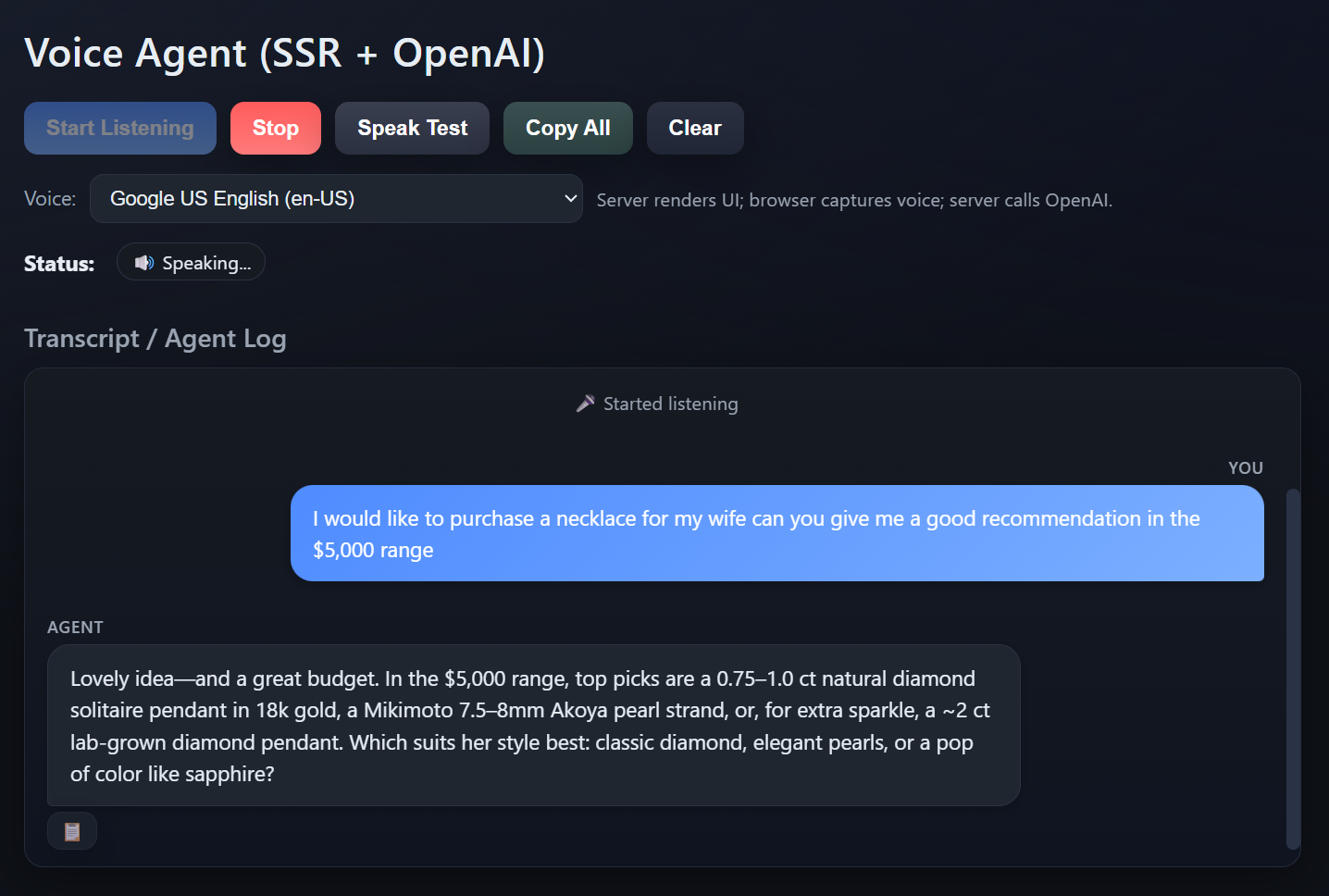
Users expect a chat interface, not a text log. Message bubbles with user messages on the right and agent responses on the left:
.msg.user .body {
  background: linear-gradient(135deg, var(--accent), var(--accent-2));
  color: #fff;
  border-bottom-right-radius: 4px; /* Speech bubble tail effect */
}

.msg.agent .body {
  background: var(--panel-2);
  color: var(--text);
  border-bottom-left-radius: 4px;
}
Transcript Copy
Two copy features: individual agent responses with a clipboard button, and a "Copy All" for the entire transcript:
elCopyAll.onclick = async () => {
  const messages = elLog.querySelectorAll(".msg");
  let chatText = "Voice Agent Chat Transcript\n" + "=".repeat(40) + "\n\n";

  messages.forEach((msg) => {
    const role = msg.classList.contains("user") ? "You" : "Agent";
    const body = msg.querySelector(".body");
    chatText += `${role}: ${body.textContent}\n\n`;
  });

  await navigator.clipboard.writeText(chatText);
};
Status Indicators
Voice interfaces lack the visual cues users rely on. Three status stages eliminate the "is it working?" confusion:
- Listening… : Microphone is active
- ⏳ Waiting for agent… : Processing on server
- 🔊 Speaking… : Playing audio response
What I Learned Building This
Async audio is harder than async HTTP. Browser audio APIs are asynchronous but inconsistent. SpeechSynthesis doesn't always fire onend reliably, especially on mobile. Always add timeouts as a safety net:
const timeout = setTimeout(() => resolve(), 10000); // 10s max
utter.onend = () => {
  clearTimeout(timeout);
  resolve();
};
Explicit state flags beat implicit state. When multiple async events can fire simultaneously (microphone input, server calls, speech output), boolean flags like isProcessing prevent race conditions. Component state alone won't cut it.
Prompt engineering for voice is its own discipline. "Speak naturally, not write" seems obvious but makes a dramatic difference in output quality. Voice-targeted prompts need to be explicit about avoiding markdown, bullet points, and structured formatting.
Browser compatibility is non-negotiable to test early. The Web Speech API has spotty support outside Chromium browsers. Testing this on day one would have saved time later. Chrome and Edge are the targets; everything else gets a graceful fallback.
Results
The finished demo:
- Latency: 2-3 seconds from speech to agent response (mostly OpenAI API time)
- Reliability: Zero feedback loops, clean state transitions, predictable behavior
- Cost: ~$0.01-0.05 per conversation
- Code: Under 500 total lines of JavaScript
- Browser support: Excellent on Chrome/Edge, limited on Firefox/Safari
The foundation is solid enough to add function calling, knowledge base integration, or authentication without major refactoring. That's the benefit of keeping things simple: complexity is easy to add later when you actually need it.
Want to try it yourself? The full code is on GitHub: https://github.com/grizzlypeaksoftware/VoiceAgent101
Tech Stack
- Backend: Node.js, Express.js, OpenAI API
- Frontend: Vanilla JavaScript, Web Speech API, EJS templates
- Styling: CSS with modern dark theme
- Voice: Browser SpeechRecognition + SpeechSynthesis
Dependencies
{
  "express": "^4.18.2",
  "ejs": "^3.1.9",
  "openai": "^4.20.1",
  "dotenv": "^16.3.1"
}